

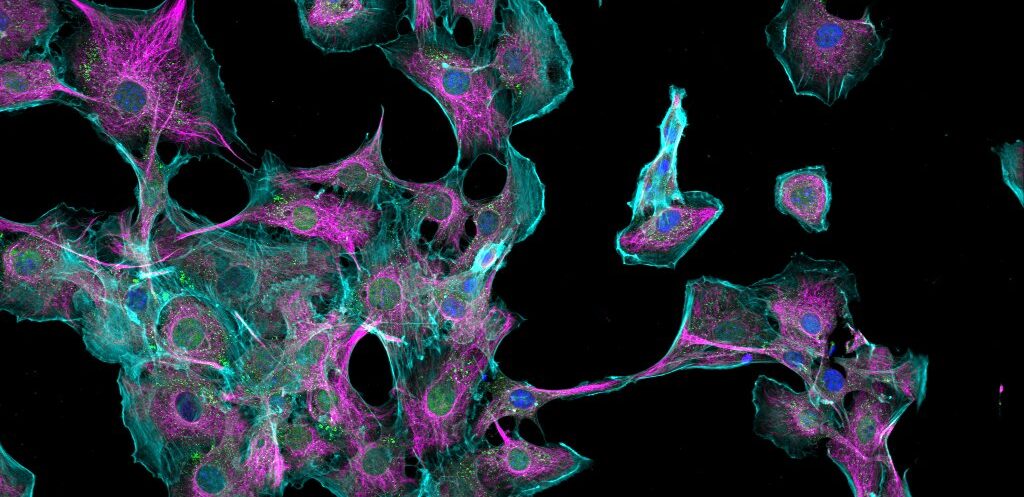
Routine microscope slides are essential for everyday microscopy. They are simple, familiar and well suited to standard sample viewing. For many applications, a general-purpose slide is exactly what is needed.
But not every imaging workflow is routine.
When users are working with fluorescence imaging, thicker samples, z-stacks, deeper imaging, multichannel workflows or microscope troubleshooting, a standard prepared slide may not provide the most useful reference point. In these situations, specialist microscope slides such as OptiSlides can offer a more practical and consistent way to assess what an imaging system is doing.
OptiSlides are ready-to-use prepared fluorescent slides designed for users who need more from a slide than basic sample viewing. They can help researchers, imaging specialists and lab teams demonstrate microscope performance, compare imaging channels, troubleshoot common issues and work with more demanding sample depths.
When are standard microscope slides enough?
Standard microscope slides are usually the right choice when the aim is routine observation. They work well for many fixed sections, simple prepared samples, stained material and everyday brightfield or fluorescence applications.
They are familiar, widely available and cost-effective for normal microscopy use.
However, standard or routine prepared slides may become limiting when the user needs to answer more specific imaging questions, such as:
- Does the microscope show clear structure across multiple fluorescence channels?
- How well does the system perform through depth?
- Can the setup support z-stack imaging or thicker samples?
- Is an imaging problem caused by the microscope settings, or by the sample itself?
- Is the slide suitable for demonstrating an advanced imaging workflow to another user?
In these situations, the slide is no longer just a sample carrier. It becomes part of the imaging workflow.
That is where specialist imaging slides become useful.
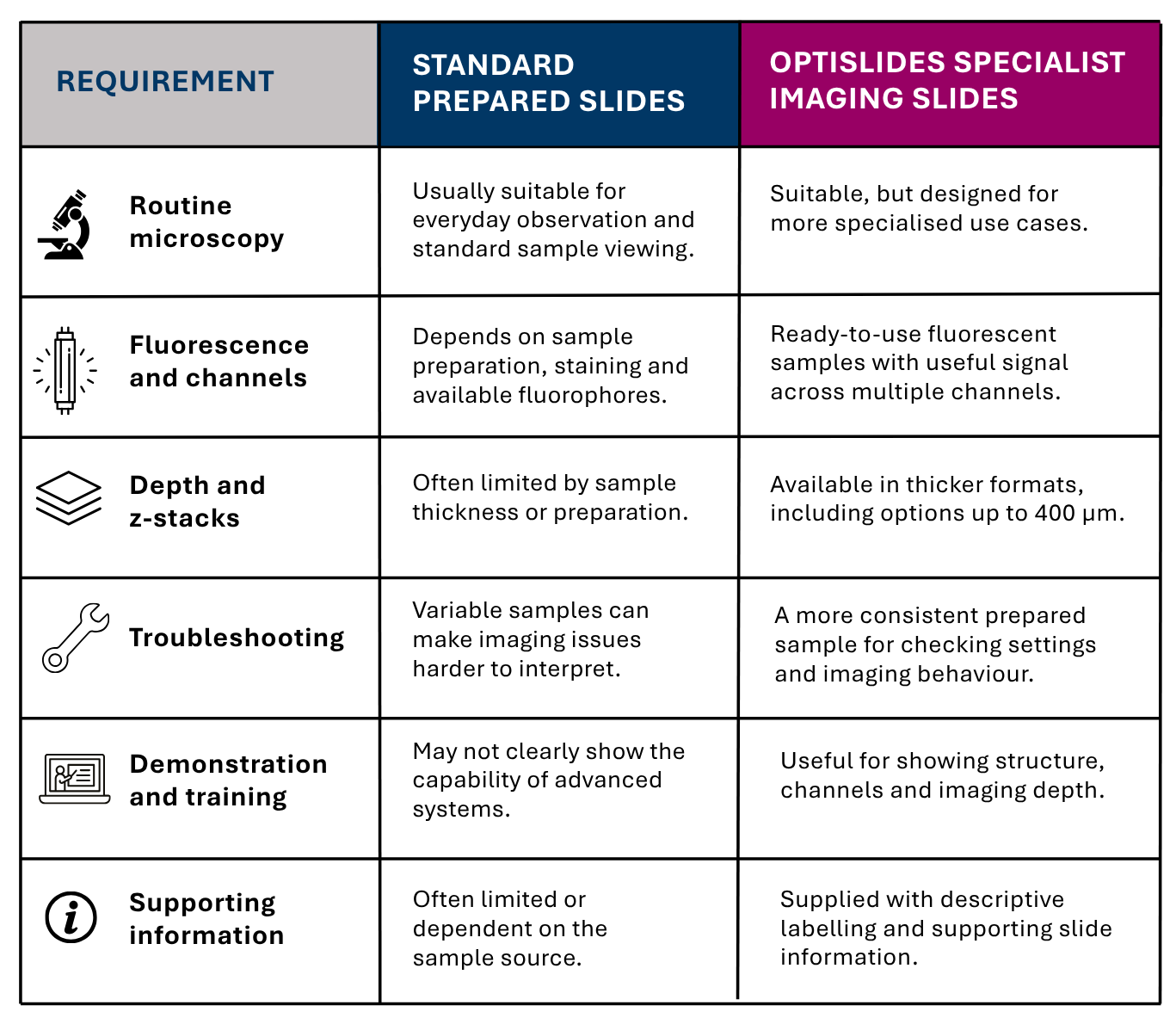
Standard microscope slides vs OptiSlides
What makes OptiSlides different?
OptiSlides are designed to fill the gap between routine prepared slides and more demanding imaging applications.
The key difference is consistency and relevance. Rather than relying on a variable in-house sample, a limited single-channel slide or a user-prepared specimen, OptiSlides provide ready-to-use fluorescent samples that are intended to show useful structure across common and advanced light microscopy workflows.
They are particularly useful where the user needs a slide that is:
- Reliable, with a prepared sample that can be used without extra sample preparation
- Relevant, with visible biological structure and useful fluorescence across channels
- More demanding than a standard slide, especially for deeper imaging, z-stacks and multichannel workflows
- Practical to use, with labelled slides, supporting information and protective packaging
OptiSlides are not intended to replace standard slides for routine microscopy. Instead, they provide a more suitable option when the application needs more from the slide.
Stone Pine Needle OptiSlides for multichannel fluorescence imaging
Stone Pine Needle OptiSlides are a useful option when users need a naturally structured, fluorescent sample for advanced imaging workflows.
The Stone Pine Needle format provides natural multicolour autofluorescence, with visible structure across different fluorescence channels. This makes it useful for demonstrating and checking how an imaging system performs across multiple channels, including blue, green, red and far-red regions.
For users working with fluorescence microscopy, this is useful because it reduces dependence on variable experimental samples. Instead of asking whether a weak or uneven image is caused by the sample, the staining, the settings or the microscope, users can start with a prepared slide that is designed to give visible, structured fluorescence.
Stone Pine Needle OptiSlides may be particularly useful for:
- Multichannel fluorescence imaging
- Widefield and confocal microscopy
- Checking channel setup and image appearance
- Demonstrating structural detail across channels
- Troubleshooting unexpected imaging results
- Supporting deeper imaging workflows where appropriate
The Stone Pine Needle OptiSlides range also includes options for spectral and 5+ channel near-infrared imaging applications, giving users a broader fluorescent reference sample than many routine prepared slides can provide.
Thick tissue OptiSlides for depth, structure and z-stacks
For users working beyond thin sections or simple surface imaging, sample thickness becomes important.
Thick tissue OptiSlides provide a more suitable prepared sample for imaging through depth, building z-stacks and demonstrating optical sectioning. Examples shown in the OptiSlides range include tissue formats such as brain and colon, with visible structure across multiple channels.
This is where a standard microscope slide can become less useful. A thin or routine prepared sample may be fine for everyday viewing, but it may not properly challenge a system that is being used for deeper imaging or more complex fluorescence workflows.
Thick tissue OptiSlides may be useful where users want to:
- Assess imaging through a thicker sample
- Demonstrate z-stack acquisition
- Compare channel behaviour at different depths
- Show tissue structure in a prepared fluorescent sample
- Support training or troubleshooting on more advanced systems
- Use a consistent sample rather than a variable experimental specimen
They can support a range of common and advanced light microscopy workflows, including widefield and confocal imaging, with deeper imaging applications possible on suitable systems.
Choosing the right OptiSlides format
OptiSlides are available in different thicknesses, allowing users to choose a format that is better matched to their imaging application.
The right choice will depend on the microscope, objective, imaging depth, fluorescence channels and the type of workflow being demonstrated or checked.
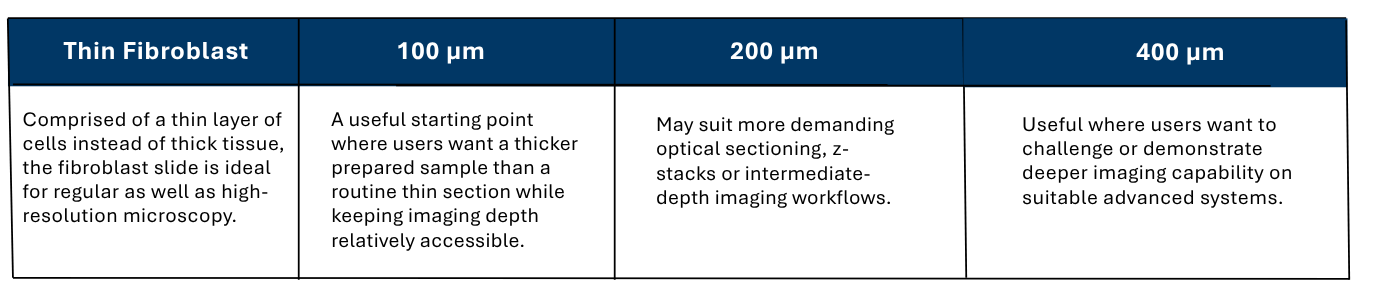
This guidance should be treated as a practical starting point rather than a fixed rule. The best option depends on the imaging setup and what the user is trying to show, check or troubleshoot.
How OptiSlides compare with other specialist slide options
Other specialist microscope slides are available, and many are useful within a defined application. However, some are designed around narrower use cases, thinner samples, fewer channels or a single imaging format.
OptiSlides are useful because they bring several practical features together in one product range:
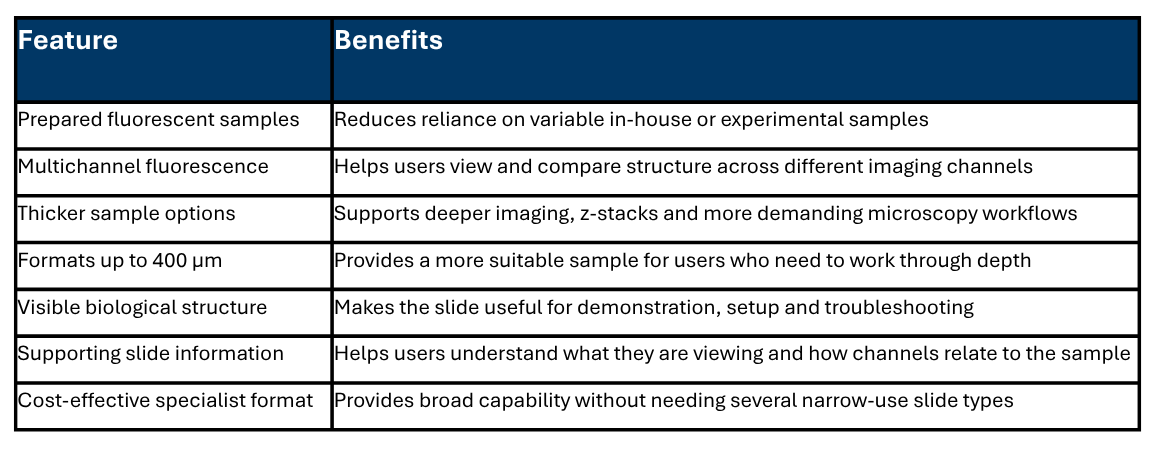
This makes OptiSlides a practical choice for labs that need more than a routine prepared slide, but do not want to rely entirely on customer samples, in-house preparations or narrower specialist alternatives.
When should you consider OptiSlides?
OptiSlides may be worth considering if you regularly need to:
- Demonstrate fluorescence imaging workflows
- Check image appearance across multiple channels
- Work with thicker samples or z-stacks
- Troubleshoot unexpected imaging results
- Train users on widefield, confocal or advanced microscopy systems
- Reduce reliance on variable experimental samples
- Compare imaging behaviour through depth
- Use a prepared fluorescent slide with supporting sample information
Standard slides remain the right choice for routine microscopy. OptiSlides are for the situations where routine slides are not enough.
FAQs
What are specialist microscope slides used for?
Specialist microscope slides are used when a routine slide does not provide enough structure, fluorescence, depth or consistency for the application. They can be useful for fluorescence imaging, microscope setup, demonstration, troubleshooting, training and deeper imaging workflows.
When should I use specialist microscope slides instead of standard microscope slides?
A standard slide is usually suitable for routine sample viewing. A specialist slide may be more useful when you need a consistent prepared sample, multiple fluorescence channels, thicker tissue, z-stack imaging or a more demanding sample for checking how an imaging system is behaving.
What are OptiSlides used for?
OptiSlides are ready-to-use prepared fluorescent slides used for advanced microscopy applications, including multichannel fluorescence imaging, deep imaging, z-stacks, demonstration, training and troubleshooting.
Are OptiSlides suitable for fluorescence microscopy?
Yes. OptiSlides are designed for fluorescence microscopy applications and include formats that provide useful signal across multiple channels. Stone Pine Needle OptiSlides are particularly useful for multichannel fluorescence because of their natural autofluorescent structure.
Can OptiSlides be used for confocal microscopy and z-stack imaging?
Yes, OptiSlides can be used in workflows such as confocal microscopy and z-stack imaging, depending on the slide format, microscope setup and application. Thicker OptiSlides formats are particularly relevant where users need to image through depth.
Which OptiSlides thickness should I choose?
As a practical guide, 100 µm may be useful as an accessible thicker sample format, 200 µm may suit intermediate-depth imaging and z-stack workflows, and 400 µm may be useful where users want to challenge or demonstrate deeper imaging capability. The best choice depends on the microscope, objective, channels and application.
How do OptiSlides compare with other specialist slide options?
Other specialist slides may be useful for specific applications, but some are narrower in format, thickness or channel range. OptiSlides offer prepared fluorescent samples, multichannel options, thick tissue formats and supporting slide information in a cost-effective specialist format.
More info on Luxidea’s OptiSlides: High-Performance Fluorescent Microscopy Slides for Laboratories
Speak to VH Bio about OptiSlides
If you are unsure which OptiSlides format is most suitable for your microscopy application, VH Bio can help you compare the available options.
Contact us by filling in the form below to discuss the most appropriate OptiSlides format for your workflow, or to request current pricing and availability.
Enquire about this article
"*" indicates required fields
